

Make your own Joomla Template: Part 4 (Activate Template)
Filed Under ( Joomla, PHP, Photoshop, Programming, Technology, Tips, Tutorial ) by admin on 07-09-2008
Tagged Under : Joomla, Tips, Tutorial
Joomla Template Tutorial - Part 4: After create ‘embryo’ joomla template, now, we try to activate the template. In Joomla, we make this template as default.
- Login to Joomla as administrator.
- Click Extensions > Template Manager.
- You can see template list like below:
- Choose mytemplate by click radio button in front of mytemplate.
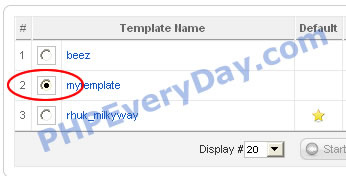
- Click Default button on top.

Now, when you point your browser to localhost/joomla, you can see ‘nothing’. Yup, because template used has changed. Active template is mytemplate. But we don’t define anything in this template. So, we just see blank page.
Related posts:
