XP Speed Secret #8: Remove Un-Used Programs & Files

Filed Under ( Hacks, Technology, Tips, Tutorial, Windows Secret ) by admin on 07-01-2009

Tagged Under : , ,

http://www.technologystory.net/wp-content/plugins/sociofluid/images/digg_48.png http://www.technologystory.net/wp-content/plugins/sociofluid/images/reddit_48.png http://www.technologystory.net/wp-content/plugins/sociofluid/images/blinklist_48.png http://www.technologystory.net/wp-content/plugins/sociofluid/images/newsvine_48.png http://www.technologystory.net/wp-content/plugins/sociofluid/images/technorati_48.png http://www.technologystory.net/wp-content/plugins/sociofluid/images/magnolia_48.png http://www.technologystory.net/wp-content/plugins/sociofluid/images/google_48.png http://www.technologystory.net/wp-content/plugins/sociofluid/images/myspace_48.png http://www.technologystory.net/wp-content/plugins/sociofluid/images/facebook_48.png http://www.technologystory.net/wp-content/plugins/sociofluid/images/yahoobuzz_48.png http://www.technologystory.net/wp-content/plugins/sociofluid/images/sphinn_48.png

You may have a bunch of software packages on your hard drive that are no longer needed, or they were gratuitously installed when you downloaded some other package. Toolbars, file-sharing programs, free email enhancers, online shopping “companions” and download managers are notorious for this practice. These uninvited guests can put a big drag on your startup time, cause web pages to load slowly, and generally bog down your computer.

  1. Click Start button
  2. Select Control Panel
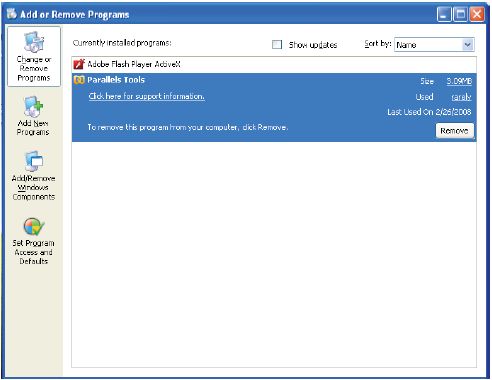
  3. Double-click Add/Remove Programs icon
  4. See what programs are installed that you don’t typically use
  5. Select the Remove button for the ones you know you don’t
    need

If you’re unsure about some programs, do a web search to learn about the ones that you need to keep.

Related posts:

  1. XP Speed Secret #7: Disable File Indexing
  2. Vista Speed Secret #8: Turn-Off Un-Needed Features
  3. XP Speed Secret #1: Disable Extra Startup Programs
  4. Vista Speed Secret #11: Shut-Off Windows Hibernation
  5. XP Speed Secret #2: Optimize Display Settings

Post a comment

HI