

Vista Speed Secret #7: Disable Automatic Windows Defender Operation
Filed Under ( Hacks, Technology, Tips, Tutorial, Windows Secret ) by admin on 21-01-2009
Tagged Under : secret, Vista, Windows


Windows Defender real-time protection against malware continues to run despite having Automatic operation disabled.
In actuality, this built-in malware protector from Microsoft is very poor at protecting your computer from external threats. You are much better off using a 3rd-party software program like XoftSpy for total protection (see Vista Speed Secret #9 for more information).
To disable:
- Click the Start button
- Type “services” into the Start Search box
- Find Windows Defender in the list of programs
- Double-click on Windows Defender
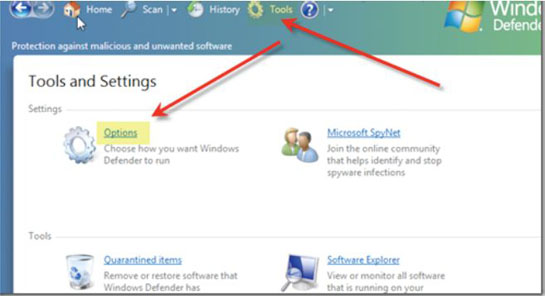
- Choose Tools from the top menu
- Select Options
- Uncheck Auto Start at the bottom of the window
Related posts:


these informations are really helpful..thnx to technologystory