

Vista Speed Secret #8: Turn-Off Un-Needed Features

Filed Under ( Hacks, Technology, Tips, Tutorial, Windows Secret ) by admin on 26-01-2009

Tagged Under : , ,

http://www.technologystory.net/wp-content/plugins/sociofluid/images/digg_48.png http://www.technologystory.net/wp-content/plugins/sociofluid/images/reddit_48.png http://www.technologystory.net/wp-content/plugins/sociofluid/images/blinklist_48.png http://www.technologystory.net/wp-content/plugins/sociofluid/images/newsvine_48.png http://www.technologystory.net/wp-content/plugins/sociofluid/images/technorati_48.png http://www.technologystory.net/wp-content/plugins/sociofluid/images/magnolia_48.png http://www.technologystory.net/wp-content/plugins/sociofluid/images/google_48.png http://www.technologystory.net/wp-content/plugins/sociofluid/images/myspace_48.png http://www.technologystory.net/wp-content/plugins/sociofluid/images/facebook_48.png http://www.technologystory.net/wp-content/plugins/sociofluid/images/yahoobuzz_48.png http://www.technologystory.net/wp-content/plugins/sociofluid/images/sphinn_48.png

There are many new features in Windows Vista that are installed by default that you may not need. These extra and un-needed features can slow down your computer and take up more storage space. Windows Features can be un-installed using the Windows Features utility. Follow these steps to uninstall applications such as the Windows Fax and Scan and many more.

To Turn-Off Some Un-Needed Features:

  1. Click on the Start Button
  2. Select Control Panel
  3. Under Programs click Uninstall a program
  4. On the left side menu, click on Turn Windows features on or
    off
  5. Scroll through the list as shown below and uncheck from any
    feature you do not want installed
    .
  6. Click OK when you are finished making your changes. The
    features will now be uninstalled.
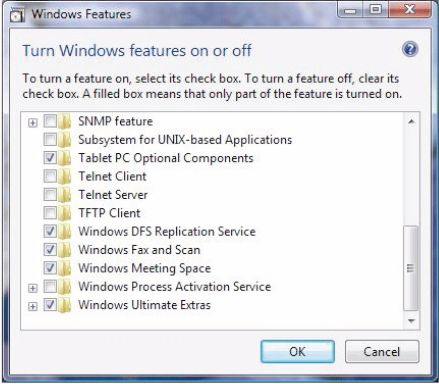
Windows Features

Related posts:

  1. Vista Speed Secret #1: Turn-Off User Account Control (UAC)
  2. Vista Speed Secret #9: Disable Unused Services
  3. Vista Speed Secret #7: Disable Automatic Windows Defender Operation
  4. Vista Speed Secret #10: Shutdown Remote Differential Compression
  5. Vista Speed Secret #4: Disable Automatic Disk Defragment

Post a comment

Facebook fan page of Technology Story Technology Story on twitter
HI