

Windows Vista Tips: Repair Corrupt Vista Files
Filed Under ( Hacks, Technology, Tips, Tutorial, Windows Secret ) by admin on 24-02-2009
Tagged Under : Tips, Vista, Windows
Some Windows Vista errors are caused by corrupt system files causing instabilities, but troubleshooting these problems manually can be almost impossible. Thankfully, Vista includes a “System File Checker” application that will verify the integrity of core system files.
There are 2 types of scan, a verification and a scan/repair mode. The former will only check the files without repairing them automatically, the latter will fix any errors it finds.
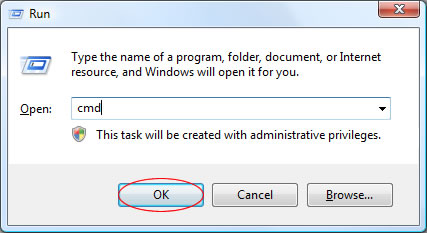
To begin, load the command prompt by starting “cmd” from the run box (Press WINDOWS KEY + R to access this):
Then, type in one of the following commands (followed by the enter key) depending on the type of scan you wish to perform:
- sfc /verifyonly - To verify any corrupt files only.
- sfc /scannow - To verify and fix any corrupt files.
This will then start the scan and inform you of any files that require fixing:
Related posts:
