

Windows Vista Tips: Disable User Access Control
Filed Under ( Hacks, Technology, Tips, Tutorial, Windows Secret ) by admin on 07-04-2009
Tagged Under : Tios, Vista, Windows
Windows Vista introduced the User Access Control (UAC) feature to improve security for the end user, however if you are an experienced power-user it is quite likely that you find UAC extremely annoying.
Fortunately, disabling it is very straight forward (although I would not recommend doing this unless you are aware of the consequences).
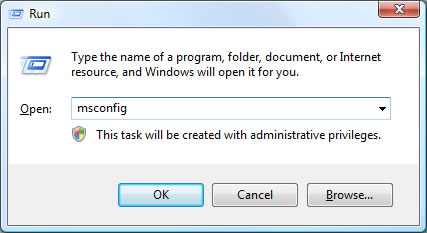
First, load the MS config utility by typing “msconfig” in the run box (Press WINDOWS KEY + R to access this) then click OK:
Once MSConfig is loaded, click on the Tools menu then select Disable UAC in the menu then click OK:
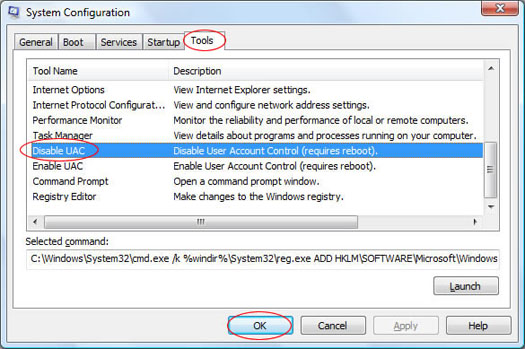
This will then run a script to disable UAC, which requires a restart to complete. If you wish to re-enable UAC, simply repeat the above steps but click Enable UAC instead.
Related posts:

[...] Windows Vista Tips: Disable User Access Control Posted on 7 April, 2009 by rakibulislam Windows Vista Tips: Disable User Access Control [...]
HAHA!! No kidding!??? It’s only been how long since Vista was slammed out?? I hope any who do want to disable this have figured it out already. This can also be done via the Control Panel and the User accounts I believe?? Not for sure since I refuse to upgrade to Vista unless I can get the 64bit for free or VERY cheap.