Sometimes you will need to move, delete or modify files within Windows, but you might get a permission error. This is probably for a good reason, as these files could be essential to the running of Vista, however sometimes file permissions can be set incorrectly.
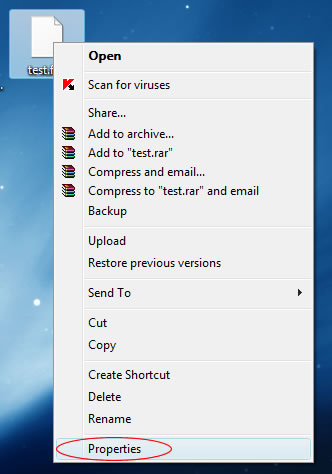
To fix this problem you’ll need to take ownership of the files by doing the following. Right click on the file you wish to take ownership of and select Properties:
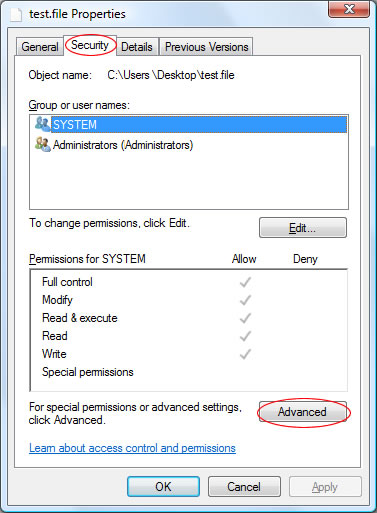
Then click the Security tab and select the Advanced button:
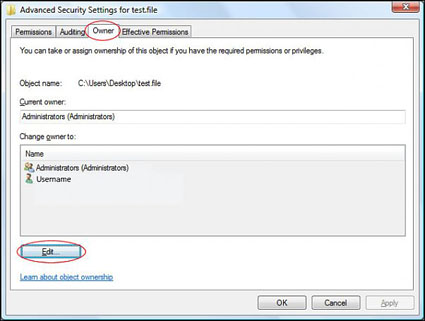
The click the Owner tab and then the Edit button:
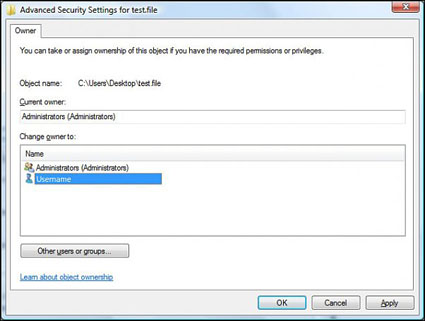
In this window, select the new owner of the file (normally, your username). Then click OK:
Windows Vista System Restore lets you roll back most of your important system files to an earlier date, but you can also restore single files or documents that have been deleted or modified since the last backup (in Vista Business or Vista Ultimate).
System restore points are automatically created each day, or at a major system event (such as installing an application).
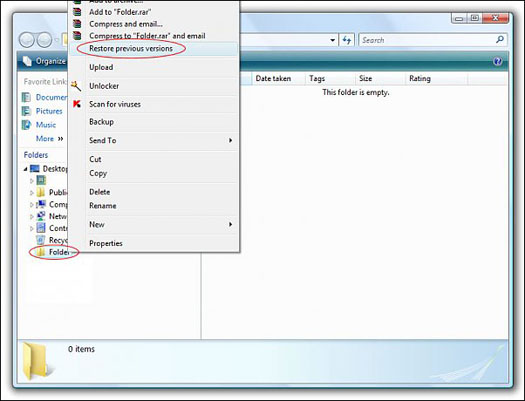
Assuming system restore is enabled, you can then restore a file by browsing to the folder it was stored in, right click on it and select Restore Previous Versions:
Once the Folder Properties box has loaded you will be presented with a list of previous saved versions of this folder. Select the restore point you wish to use by clicking on it (in this example, there is 1 restore point):
When Microsoft introduced Office 2007, they switched the primary Word document format from .doc to .docx. For various reasons, this Office Open XML format is generally a much better storage format, but it anyone without Office 2007 will lack the appropriate tools to open the file.
You have two primary options if you wish to convert a .docx file to .doc, so that you can view the contents.
If you already have an older version of Microsoft Office you can install the Office Compatibility Pack, which adds .docx open/edit/save functionality to Office 2000/2003. This download is 27.5MB in size and means you can quickly upgrade your existing Office installation to cater for .docx files.
If you don’t have Microsoft Office you can open the files using Microsoft Word Viewer, or use some of the online converters to turn docx files into doc:
Either of these methods will allow you to convert docx files with ease, although it is recommended that you install the Office Compatibility Pack if you already have Microsoft Office installed.
It is possible to hide a hard drive letter using Windows Vista, preventing it from showing up in applications and Windows Explorer. However, this will not prevent you from access files from it manually (by browsing directly to it by typing “D:” for example). This can be useful to hide files quickly and easily.
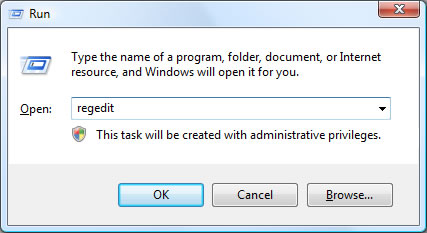
To being, load the Registry Editor from the run box (Press WINDOWS KEY + R to access this) by typing “regedit” and clicking OK:
Once this loads, browse to the following registry key on the left hand side: