

Windows Vista Tips: Hide Hard Drive
Filed Under ( Technology, Tips, Windows Secret ) by admin on 07-05-2009
Tagged Under : Tips, Tutorial, Vista, Windows
It is possible to hide a hard drive letter using Windows Vista, preventing it from showing up in applications and Windows Explorer. However, this will not prevent you from access files from it manually (by browsing directly to it by typing “D:” for example). This can be useful to hide files quickly and easily.
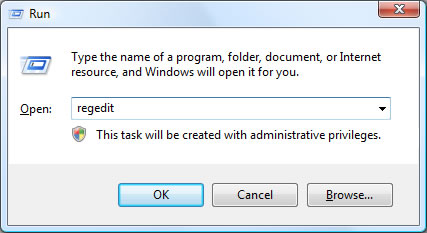
To being, load the Registry Editor from the run box (Press WINDOWS KEY + R to access this) by typing “regedit” and clicking OK:
Once this loads, browse to the following registry key on the left hand side:
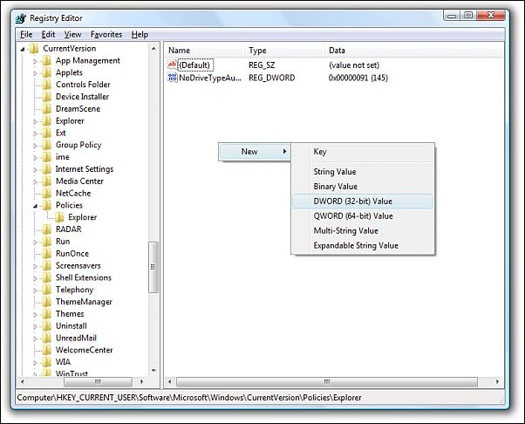
HKEY_CURRENT_USER\Software\Microsoft\Windows\Curre ntVersion\Policies\Explorer
Then, right click on the white space in the right hand side and select New > DWORD (32-bit) Value, and call it “NoDrives“:
Double click on “NoDrives” to enter a Decimal value. This value depends on the drives you wish to hide, and is created by adding the numbers for each drive you wish to hide from the list below. Click OK once you have entered this number.
For example, to hide drive D you would enter a decimal value of 8. To hide both drives D and E, you would enter a decimal value of 24 (8+16):
A = 1
B = 2
C = 4
D = 8
E = 16
F = 32
G = 64
H = 128
I = 256
J = 512
K = 1024
L = 2048
M = 4096
N = 8192
O = 16384
P = 32768
Q = 65536
R = 131072
S = 262144
T = 524288
U = 1048576
V = 2097152
W = 4194304
X = 8388608
Y =16777216
Z = 33554432
All drives = 67108863
Related posts:

[...] Windows Vista Tips: Hide Hard Drive Posted on 7 May, 2009 by rakibulislam Windows Vista Tips: Hide Hard Drive [...]