adsense Browser CSS easy learn joomla programming Fix google Hacks Javascript Joomla joomla code joomla programming MySQL PHP Programming secret speed Technology Template Tips Tricks Tutorial Video Vista Windows

Windows Vista Tips: Unidentified Network

Filed Under ( Network, Technology, Tips, Tutorial, Windows Secret ) by admin on 27-07-2009

Tagged Under : , , ,

Windows Vista can sometimes cause network adapters to show up as connected to an “Unidentified Network”, sometimes limiting the network to local access only.

There are many reasons that can cause this problem, but some suggested solutions to try are:

  • Reset your Router using the web control panel.
  • Update your network adapter drivers.
  • Temporary disable any Anti-Virus/Firewall package to see if the problem is resolved.
  • Try assigning a static IP address to the network card.
  • Disable IPv6 on old network cards / routers.

These suggestions may help you narrow down the cause of the “unidentified network” problem.

Windows Vista Tips: Change Workgroup

Filed Under ( Network, Technology, Tips, Tutorial, Windows Secret ) by admin on 27-07-2009

Tagged Under : , , , , ,

Workgroups are an easy way of grouping a collection of network PCs (for example, all of the computers in your house could be one). When you get your PC you may find that it is already of a workgroup and want to change it, or perhaps you need to join a new workgroup.

To start this process, press WINDOWS KEY + PAUSE/BREAK to load up the System information window. Then click Change Settings under the Computer Name, Description and Workgroup settings menu:

Then, click Change:

Now type in your new workgroup into the appropriate box and then click OK:

You are now a member of the new workgroup and should be visible to other networked PC’s.

Windows Vista Tips: Printer Sharing

Filed Under ( Network, Technology, Tips, Tutorial, Windows Secret ) by admin on 27-07-2009

Tagged Under : , , , ,

Many people will have a network of computers, with a central printer connected to only a single PC. It is easy to share this printer with user networked computers, allowing everyone in your workgroup to print directly.

First of all, you need to enable printer sharing on the host PC (the one with the printer directly attached). This allows other PCs to see the shared printer and connect to it via the host computer. To do this, open the Control Panel by clicking on the Start Menu > Control Panel:

Then, click View Network Status and Tasks:

If printer sharing is disabled, click the button next to Printer Sharing, then Turn on Printer Sharing and click Apply:

Printer sharing is now enabled on the host computer, allowing access to the connected printers (as long as a username/password from that PC is used).

On the PC you wish to grant access to the printer, browse the network from the host PC to view the printer listing. Once you have found the shared printer you wish to use, right click on it and select Connect:

It may require a username and password from the host computer, if so type these details in. Windows should now install the required drivers and add access to the shared printer, allowing you to print from any application.

Diamond Ring

Filed Under ( Flickr, Photography ) by admin on 25-07-2009

Tagged Under : , , ,


Diamond Ring, originally uploaded by lrnirjhar.

Diamond Ring

Solar Eclipse 2009

Uploaded by lrnirjhar on 24 Jul 09, 2.22AM PDT.

Total Solar Eclipse 2009

Filed Under ( Flickr, Photography ) by admin on 25-07-2009

Tagged Under : , , ,


Total Solar Eclipse 2009,originally uploaded by lrnirjhar.

I(Nirjhar) took this photo from Rangalirbash Village of Nageshwari Upozilla of Kurigram Disctrict, Bangladesh. This is my own village.
You can find my photos at wikipedia.

I used a Canon 5D MarkII camera with a 200mm lens.

Uploaded by lrnirjhar on 23 Jul 09, 9.31PM PDT.

I call this “My Diamond Ring”

Filed Under ( Flickr, Photography ) by admin on 25-07-2009

Tagged Under : , , ,


I call this "My Diamond Ring", originally uploaded by Z.Faisal.

I call this “My Diamond Ring”

It was the longest total solar eclipse during the 21st century. couldn’t help bunking my office and traveled 800km exhausted road trip. But, witness such moment worth it all.

North end of Bangladesh.
Haribhasha, Madhupara, Panchagar
22nd June ‘09

[Panchgar_220709__28172]

Uploaded by Z.Faisal on 25 Jul 09, 12.43AM PDT.

Windows Vista Tips: Change IE7 Default Search

Filed Under ( Browser, Technology, Tips, Tutorial, Windows Secret ) by admin on 20-07-2009

Tagged Under : , , , , ,

Internet Explorer 7 that comes with Windows Vista automatically defaults to using MSN as the search provider. Many users will want to use an alternative search engine such as Google or Yahoo.

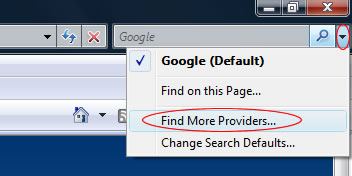
You can easily change providers by loading IE7 and clicking on the small arrow to the right of the search box, then clicking “Find More Providers“:

Find More Providers...

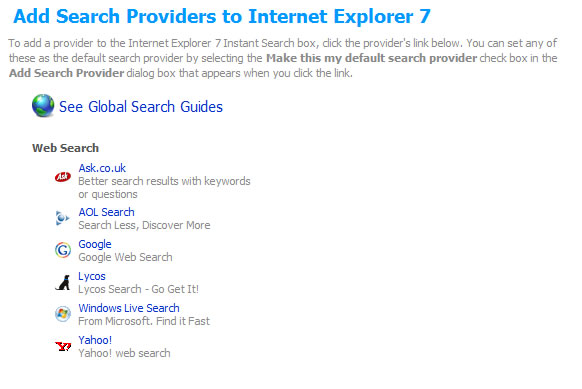
This will load a list of other large search engines, from which you can choose to make the default option (simply click on your choice):

Add Search Providers to Internet Explorer 7

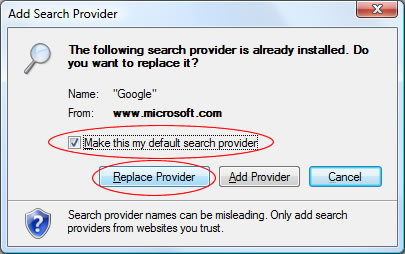
This will bring up a dialog box asking you to confirm your selection. Tick the “Make this my default search provider” box and then click Replace Provider. This will make the search engine you have selected the default search engine for any queries performed in the IE7 search box.

Add Search Provider

Windows Vista Tips: Clear Search History

Filed Under ( Browser, Technology, Tips, Tutorial, Windows Secret ) by admin on 20-07-2009

Tagged Under : , , , , ,

Clearing your search history has never been easier when using IE7 in Windows Vista. Simply load up Internet Explorer and then click on the Tools menu, then select “Delete Browsing History“:

Then, click the buttons next to the items you wish to remove from your PC (you can delete all by clicking the button at the bottom of the window). Most people would want to remove the History and Form Data (which keeps a record of what you type in to forms). To do this, click Delete History and Delete Forms: