adsense Browser CSS easy learn joomla programming Fix google Hacks Javascript Joomla joomla code joomla programming MySQL PHP Programming secret speed Technology Template Tips Tricks Tutorial Video Vista Windows

3.4 Joomla Content Menu

Filed Under ( Joomla, PHP, Programming, Technology, Tutorial ) by admin on 20-11-2009

Tagged Under : , , ,

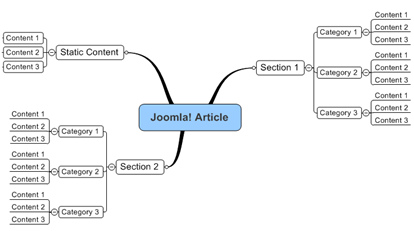
Content Menu contains of everything that is related with the content management in Joomla! The content that is with the HTML format text is also called as article in Joomla! The content structure in Joomla! can be described such as the following:

Organizing article structure in Joomla!

Picture 3.49 The organizing article structure in Joomla!

Read the rest of this entry »

3.3.4 Make New Joomla Menu

Filed Under ( CSS, Joomla, PHP, Programming, Technology, Tutorial ) by admin on 12-11-2009

Tagged Under : , , ,

Adding New Menu

In this subsub chapter, we will try to make new menu. By knowing the making of the new menu, you can make your own menu according to your needs. Here are the steps in making new menu:
Read the rest of this entry »

3.3.3 Joomla Trash Manager

Filed Under ( Joomla, PHP, Programming, Technology, Tutorial, Windows Secret ) by admin on 04-11-2009

Tagged Under : , , ,

As I already said before, when you are deleting the menu item, he will not delete it directly but it goes to the Trash Manager. To access the Trash Manager, you can through Menus > Menu Trash.

In the Trash Manager list, the entire menu item that is already deleted appears in this list. Through Trash Manager, you can do two things:

1. Delete the file permanently 2. Or, restore the file
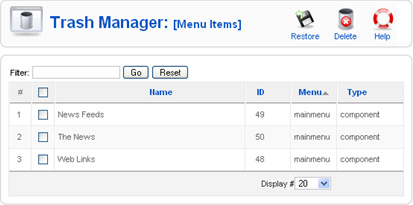
Trash Manager

Picture 3.38 Trash Manager

Delete the Menu Item

In deleting menu, you can check the checkbox in the menu item that you want to delete. Then, click the Delete icon. After you delete the item through the Trash Manager, the menu item is really gone and you cannot restore it back.

Restore the Menu Item

Restore is the process of returning the menu item into the menu source. If we heard about the word “restore”, possibly you will remember about the recycle bin facility in windows explorer. You can return the file that has been deleted but stills keep in the recycle bin. Well, the restore function is the same with the recycle bin restore.